
As a designer, have you ever asked following questions on the product you designed:
“It doesn’t seem to be what I designed.”
“This is different from what I thought.”
“It should’ve used the library components, why it’s not the same?”
If you only have these doubts after product release, you may need design QA in your design process.
Why Do We Need Design QA
Design QA is a key step in the design process. A designer’s responsibility is not just design and hand over to developers, but also to ensure that the details of the design have correctly implemented. Once the code is ready in the test environment, the designer should participate in the product test to ensure that the final product is consistent with the design, as well as spotting bugs and problems during the test process.
We often find that the developed product is different from the design and our expectations. This is usually due to three reasons:
1. The developer’s brain works differently from designer’s
It is common that developers understand specifications differently from designers. Due to the misunderstanding, sometimes developers will develop it as what they feel right but not what designers intended to. Designers need to pick out these problems in the design QA process and fix them with developers so that the product is not just working but with good user experience.
2. Design Issues
Some design issues may be discovered after development, especially the subtle experience of micro interaction, or edge cases that are not considered. Although the designer are expected to avoid issues caused by the design before development, there is always a possibility that the actual performance is not what you expected. Design QA is a good opportunity to check design issues again.
3. The developers didn’t follow the design
Sometimes, it may simply because that the developers do not pay attention to the details of the design. Developers have different focus from designers, thus developers are likely to involuntarily ignore some design details. This is also the reason why design QA is required.
Due to the above reasons, there’s always a gap between developer’s implementation and the design. Design QA provides a chance for designers to find and fill the gap between them, and help find possible issues in the design.
If design QA is missing in the design process, it is likely to cause UX debt. This concept originated from Ward Cunningham’s concept of Technical Debt, a word used to describe the debt incurred in the later stage due to the simpler rather than a more perfect way of implementation in the development stage. Joshua Kerievsky applied it in the field of user experience. He believes that it is like technical debt. Whether it is to save time or because of technical constraints, we finally have to pay a price to repay UX debt.
Design QA Process
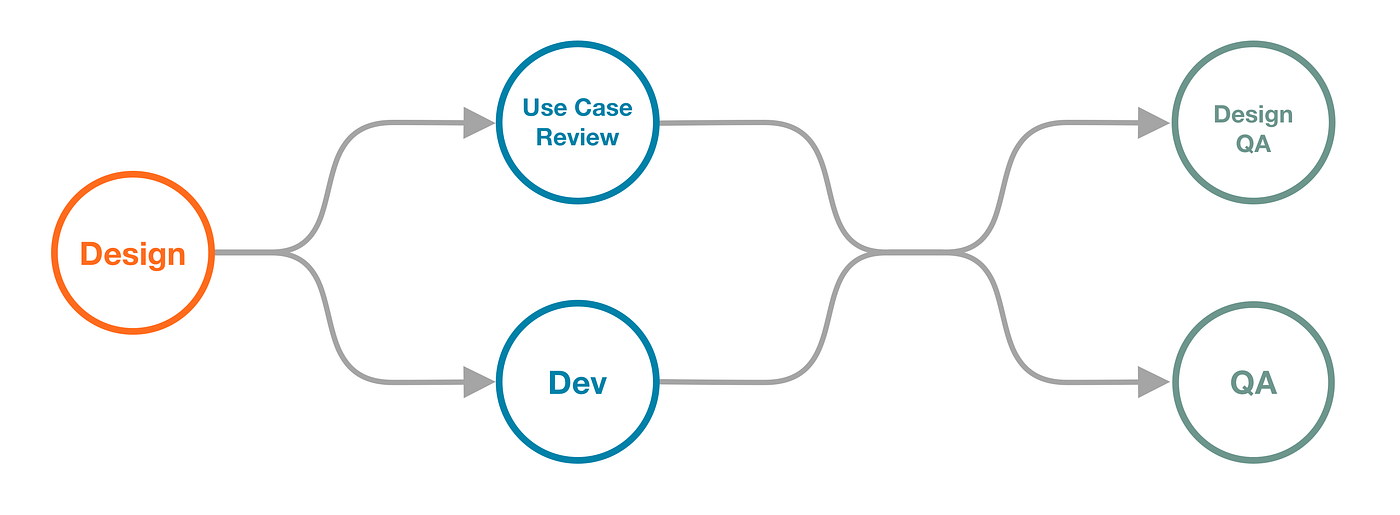
Design QA is preferably carried out in parallel with technical QA after development. Once the product is ready to test, you’ll have a functional demo to play with. Make it parallel with technical QA can avoid the entire process taking too long or causing repeated work for technical QA.
On the other hand, it is often said in medical science that prevention is better than cure. This is the same in product development.
To avoid problems being found only after the product release, we need to conduct QA before going online. In addition, to minimize problems in the demo we receive, we not only need to make a detailed specification in the design, but also participate in the test case review initiated by QA.
QA will write corresponding test cases for requirements to guide product testing. For some complicated requirements, QA will initiate test case review session with all stakeholders to review. This is a good opportunity for designers to understand how developers and QAs understand the design. Also, it helps expose any misunderstandings, and can be aligned immediately to avoid developers implement in a wrong way. When the requirements and business logic are complicated, test case review can help find and avoid many potential problems.
How Design QA Works
Let’s get a test version or a test URL, enter the test environment, and then you can look for potential issues like a hunter looking for preys.
I will generally focus on the following things during design QA:
Anything inconsistent with the design
Detail experience and the implementation of animations
Edge cases
To complete design QA with least problems left, I normally use the following methods:
1. Compare and review
Compare the design document with the demo implementation. We are able to find the differences between the implementation and the design by comparing these two. As mentioned earlier, the misunderstanding between designers and developers and the negligence by developers can easily lead to the difference between the implementation and the design. Therefore, compare and review with the design document can help us find anything that is missing or wrongly implemented.
2. Apply user scenarios
Simulate user scenarios for design QA. We can write some user scenarios to reflect the steps and tasks that users will take. By getting into user’s role to complete the process, we can find possible issues in the real scenario. For example, the user may need to switch the app to view other information when entering text, and find out the entered content has been erased after switching apps, or the user may find that the text is not correctly displayed after entering a large amount of text.
3. Complete walk through
Walk through all relevant elements and processes. The implementation is usually not an independent part from other features, it will interact with others. Therefore, in addition to test the designed features, it is also necessary to test other features that are not designed to be changed in this development, including unchanged features in the same page, as well as the upstream and downstream processes of the designed feature.
Creating a Design QA Document
It is seen that many designers are used to throwing problems into the IM after problems being identified. In that way, problems are often unnoticed, lost, and untraceable. Additionally, it makes design QA less official. Therefore, it is necessary for designers to create a well-formatted design QA document.
The design QA document should preferably support online collaborative editing, so that the problems can be synchronized to relevant stakeholders, and the business side are also able to record problems in the same document if they participant in the QA process (which is welcome). Further more, stakeholders can trace the solution to the problem, whether it is fixed and reviewed by designer again. For the format of the document, my best practice is to record in a form of spreadsheet. Each problem occupies a row, and each column consists relevant information of the problem.

1. Number
Number every problem. it helps stakeholders quickly understand which problem they are talking about when communicating with each other.
2. Client
For multi-client requirement, we need to note which client the problem refers to, so the corresponding developers can fix it. You can also create separate documents for each client, then you don’t need this column in that case.
3. Location
Describe where the problem occurs, so the developers can locate the problem. Usually I will describe it in the format of “Page-Module”. For example, “home page — Recommended”, or “playing screen — progress control”, etc.
4. Current Behaviour/Expected Behaviour/Screenshot
A typical way to describe a bug. For each problem we found, describe what the current behaviour and problem is, and what the solution and behaviour we expect. With this description, the developer can understand what the problem is and what the final presentation the design wants to achieve, thus fix the problem correctly.
When describing the problem, we may need to describe whether it is occasional or definite, how to trigger the problem and current behaviour, as well as client model. For complicated problems that are not easy to understand by text description, a screenshot or a screen recording can be helpful, compare the screenshot with the design would be easier to understand.
5. Priority
We can use the risk matrix to decide the priority of the problem based on its severity and likelihood (to happen) of the problem.
Severity refers to the impact of the problem on user experience and business requirements. Likelihood refers to whether the problem occurs occasionally or definite, whether it is in the main process or a branch that is rarely used. You can see the examples with different priorities listed below according to the risk matrix:
High: the function does not meet the requirement, there’re major experience problems, etc. (e.g. text or pictures are obviously misplaced, entering a dead end and unable to exit)
Medium: experience problems that won’t stop users to complete the task, or inconsistent behaviour (e.g. the exit animation is not consistent with other pages, or the coverage of hot spot is slightly small)
Low: problems that are not easy to trigger and do not affect the use of the feature, possible experience optimization, etc. (e.g. non-serious copywrite problems, optimization of animation)
A defined priority helps designers decide can we release the product with problems unsolved (due to cost and time) and how we deal with problems left after product release.
Generally speaking, high priorities should be fixed before going online. Medium priorities need to be fixed in the next one or two iterations. Low priority problems can be fixed when there’s opportunities to make it fixed in a certain iteration. I’ll also ask developers to add a difficulty dimension to understand the cost to fix the problem and take that into consideration .
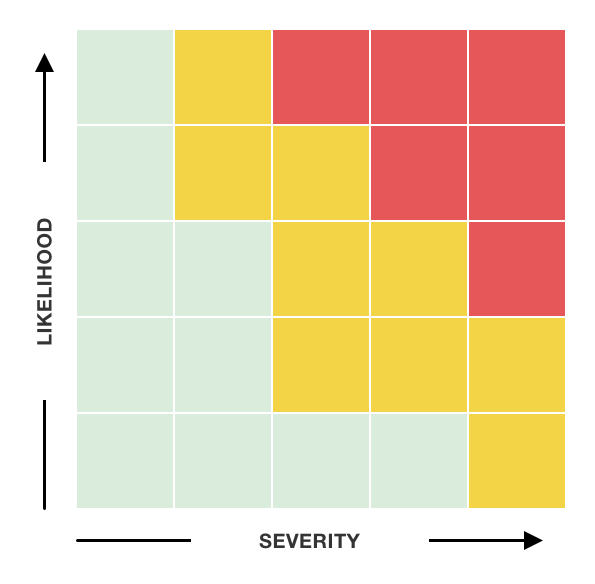
Risk Matrix
6. Fixed Confirmation
It is better to provide a check-box for developers to tick a problem in one click. Developers can tick it after problems being fixed. Once designers see the problems is ticked, we can start second round QA.
7. Note
If it is difficult for developers to fix or a different method is adopted, the reason for not fixing the problem, or downgrade plan can be mentioned in the Note column, and we can go offline communication after first round of bug fix.
8. Design Check
The fixed problems need a second round design QA by designers to ensure that the problems have been fixed as expected. If the result doesn’t meet the expectation, we should make a note here.
9. Dev Name
Sometimes, there are multiple developers involved in a requirement. Developers should claim the problem they are responsible for. Designers can therefor know whom to communicate with offline and improve efficiency.
Design QA Problems and Solutions
I have also encountered some problems in the process of design QA. The followings are common problems I’ve met and solutions of my best practice.
1. If there’s no time to fix the problem, shall we delay the product release?
Every designer may have the experience of arguing with the product owner about whether a problem should be fixed before release. For the team that adopts agile method through rapid iteration, one can use the priority I mentioned above to decide when to fix the problem. High priority problems are generally problems that must be fixed before going online, and other problems can be fixed later. Therefore, define the priority first with the product owner according to the nature of your product, and then apply it in the work.
2. How to push the fix in the following iteration?
It is better to fix remaining problems in the following iterations otherwise the UX debt will eventually come to you. The unsolved problems should be recorded in one document. Each iteration should reserve some resources to fix the remaining problems, or fix them through other requirements. The designer also needs to actively ask the developer about the cost of the solution, it would help fix problems. For problems that do not require a standalone requirement, urging QA and developers regularly can also help push the problem to be fixed. For example, I once found a problem that depends on a pre-work of another team. As I asked regularly, when the pre-work was completed, QA informed me immediately and the problem was fixed soon. Anyhow, only by creating a system to fix the remaining problems can we better solve the UX debt.
3. Prevent product release without design QA
Primarily, we should create an official design QA process. Align design QA process with developers, QAs and product owner, make it official, and ensure that the designer has reviewed the product before going online. In addition to the process, it should also ensure that the designer is able to know the demo is ready and there’s a method to notify the designer. In Cloud Music, we have automated this process with every information that a designer needs to start design QA are automatically sent to us. We know what environment to use, what account to log in, how to load the mock data, and the most important information — when the product will be released. We can therefor avoid the delay of design QA due to other work and avoid insufficient time for developers to fix.
Summary
Design QA is an important and indispensable part of the design process. The above design QA process and follow-up procedure are effective methods for us in Cloud Music through communicating with many stakeholders. The design QA document, how to design QA and problem solving are the best practices in our work. The design QA document is designed after communicating and interviewing with developers and QAs, which is convenient for them and designers as well. As a UX designer, the user experience of developers as the user of the design QA document should also be considered.
A small tip to my designer fellows, when we describe the problems, it is better to use the word “unexpected behavior” instead of “bug”. It helps to maintain a better relationship with developers :).
References
A. Kaley , ‘UX Debt: How to Identify, Prioritize, and Resolve’, Nielsen Norman Group, 2018, https://www.nngroup.com/articles/ux-debt/, (2021–11–17).
K. Dunwoody, S. Rector , ‘UX Debt in the Enterprise: A Practical Approach’, UXPA Magazine, 2015, UX Debt in the Enterprise: A Practical Approach, (2021–11–17).
J. Talbot , ‘What’s right with risk matrices?’, Success and Leadership, 2017, What’s right with risk matrices?, (2021–11–17).
Redwerk. “QA Illustration.” dribbble, 23 Nov. 2021, QA Illustration.